Pain Tracker: User Manual
Pain Tracker is a private diary for chronic pain, migraine and recurring complaints. You record how bad it was, what you took and what set it off; the app turns that into a calendar, charts and a PDF you can hand to your doctor.
Everything stays on your phone. There is no account, no cloud, no ads and no tracking. Nothing you type is ever uploaded.
Pain Tracker does not give medical advice and does not replace a doctor. It records what you tell it, so that you and your doctor have something better than memory to work from.
Contents
- 1. First start The tour, choosing a look, allowing notifications
- 2. Getting around The five tabs, the pain scale, the colour code
- 3. Logging pain Pain level, quality, triggers, notes, editing, deleting
- 4. Medications and intakes Adding medications, reminders, logging intakes, history
- 5. Appointments and significant events Doctor visits, reminders, marking what happened
- 6. Activities Healthy habits and their nudges
- 7. Pain actions Your plan for bad days, and relief suggestions
- 8. The month view The colour calendar, day details, adding to a past day
- 9. Trends and insights Charts, ranges, what each chart means
- 10. Exporting for your doctor PDF layouts, CSV, what gets printed
- 11. Logging without opening the app Home-screen widget, Quick Settings tiles
- 12. Settings, privacy and backup Language, theme, app lock, backup, deleting everything
- 13. Questions and answers Common questions and troubleshooting
The 60-second version
- Log pain. Home → Enter Pain → pick a level from 0 to 10 → Save.
- Log a medication. Home → Enter Medication → pick it → Save.
- Look back. The Month tab colours every day by its worst level. The Trends tab charts the last 7, 30 or 90 days.
- Take it to your appointment. Month → share icon → Export PDF → pick one to three months.
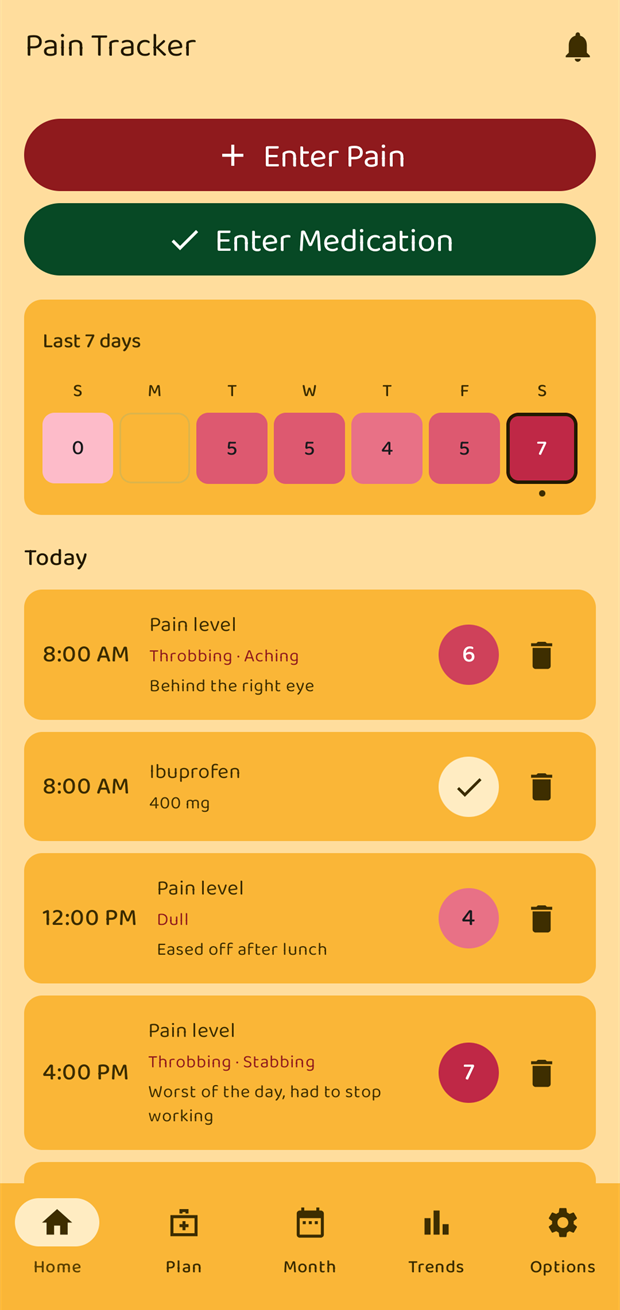
A note on the screenshots
All screenshots in this manual were taken on a phone in English with the app's default amber theme. If you use a different language or theme, the wording and colours will differ but every screen is in the same place.
The example diary in the screenshots is made-up data covering June to August 2026.